The Watercolor Floral Heart Clipart That Elevates Your Creative Projects
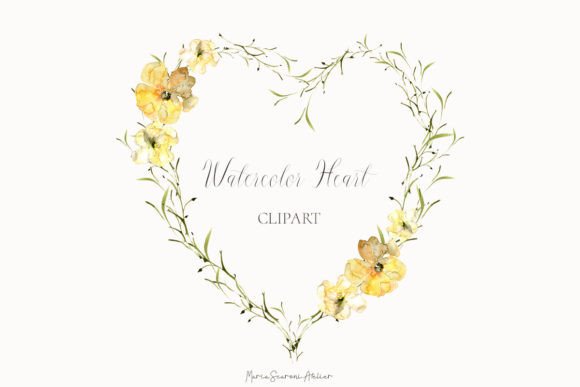
In a digital world where authenticity and handmade charm are increasingly prized, Watercolor Floral Heart Clipart offers a unique bridge between artistry and convenience. This is not a sterile, vector-generated shape; it is a captured moment of artistic expression—a heart-shaped wreath painted with real watercolors, featuring delicate yellow flowers and wispy evergreen leaves. For creators across industries, this type of clipart provides a ready-made solution to infuse projects with warmth, color, and a touch of organic elegance without the need to master painting techniques themselves.
Common Missteps When Selecting and Using Watercolor Clipart
The appeal of such a beautiful, pre-made element like a Watercolor Floral Heart Clipart Valentine Wreath can sometimes lead to rushed decisions. Understanding a few common pitfalls can ensure your final project looks professional and achieves its intended impact.
Overlooking the “Ready-Made Arrangement” Nature
A primary detail often missed is that this is a completed wreath picture. The listing explicitly states no individual pieces are included. Many creators, especially those designing complex invitations or layered digital scrapbook pages, might purchase assuming they can separate the yellow flowers from the leaves or the heart shape itself. This misunderstanding can halt a project. If your design requires modular elements you can reposition independently, you need to look for a different product—one offering individual layered files or a set of separate illustrations. This specific clipart is designed for you to “quickly add a pop of handmade color” as a cohesive, singular artistic element.
Assuming All “High-Resolution” Files Are Equal
The listing includes key technical specs: 1 PNG file with a transparent background at 300 DPI and dimensions of 3150 x 2970 pixels. These are excellent qualities. However, a common oversight is not checking how these specs align with your specific use case. For a phone wallpaper or blog graphic, this size is more than sufficient. But for large-scale physical prints, like a party backdrop or a large wall decoration, you must calculate the maximum physical print size. At 300 DPI, 3150 pixels translates to a print width of roughly 10.5 inches. Printing it larger will require resizing, which can lead to a loss of detail and softness. Always calculate the intended print size from the pixel dimensions before finalizing your purchase.
Neglecting the Surface and Medium Compatibility
The suggested uses are broad: T-shirts, mugs, phone cases, tote bags, planner covers, greeting cards, and more. A mistake is applying the same file indiscriminately across all these surfaces. While the PNG is versatile, the success of the final product depends on your preparation. For physical products like mugs or T-shirts, the file must be provided to the manufacturer or printer in a format and color mode they require—often CMYK for professional printing, whereas digital screens use RGB. Simply sending the PNG without consultation can result in muted or inaccurate colors on your physical merchandise. For digital uses like dashboards or web design, ensure the file’s size is optimized for web performance to avoid slowing down a site.
Practical Advice for Optimal Results
To harness the full potential of your watercolor floral heart clipart, a little forethought transforms it from a simple download into a powerful design asset.
Define Your Project’s Core Need First
Before browsing any marketplace, ask yourself: “Is my need for a complete, focal-point graphic to convey a mood quickly, or for a deconstructable toolkit to build a custom layout?” If the answer is the former—for instance, creating Valentine’s Day greeting cards where the wreath serves as the central artwork—this type of clipart is ideal. It saves time and delivers a consistent artistic quality. If your need is the latter, seek out watercolor element packs. This simple clarification prevents frustration and wasted resources.
Master the Basics of File Management
The listing reminds you, “You must have a computer to save extract the individual files.” This is a basic but crucial step. Always save the original high-resolution file in a dedicated “Source Assets” folder. Before using it in any project, create a working copy. This preserves the pristine original for future uses. When placing it into design software, use the transparency to layer it over backgrounds effectively. A poor approach is dragging the file onto a busy patterned background that clashes with the delicate watercolor tones; a better approach is placing it on a simple, complementary solid color or subtle texture to let the artwork shine.
Consider Color Harmony and Context
Hand-painted watercolor illustrations have unique color blends and soft edges. A common error is treating them like a bold, solid-color vector graphic. To integrate it seamlessly, analyze its color palette. The “delicate yellow flowers and wispy evergreen leaves” suggest a soft, spring-like warmth. Choose accompanying fonts, borders, or additional graphics that harmonize—perhaps soft grays, creamy whites, or other pastel tones. Avoid harsh, saturated reds or black heavy lines that can overpower the clipart’s gentle aesthetic. This attention to context elevates the entire design.
What to Verify Before Your Final Decision
Making an informed choice about any digital asset, including this charming wreath, involves a quick but essential checklist.
First, confirm the license terms. Most listings like this are for personal and commercial use, but it’s vital to read the shop’s policies to ensure your specific application (e.g., logo design, product sales) is permitted. Second, review the transparent background in a preview. A true transparent PNG should show no white fringe or leftover pixels around the delicate leaves; this ensures clean overlays. Third, match the artistic style to your brand or project’s voice. This watercolor heart is rustic and heartfelt. It may not suit a project requiring sleek, modern, or minimalist graphics.
Ultimately, Watercolor Floral Heart Clipart is a tool of efficiency and beauty. By understanding its nature as a complete artwork, respecting its technical parameters, and thoughtfully integrating it into your design context, you avoid the common pitfalls that lead to underwhelming results. Instead, you unlock its ability to add that coveted “handmade color” to your invitations, products, and creative ventures, communicating care and artistry in every application.